


Last Updated on 2 days ago by Sachin G
When a server fails, even though everything “looks normal.”
Every experienced Linux engineer has hit this moment: a production system collapses with no obvious metric spike, logs look clean, and resource graphs appear stable—yet the application suddenly breaks. This is where the dreaded “too many open files linux” error silently shows up long after the damage is done.
A production service goes down without warning. CPU is fine. RAM is fine. Disk I/O looks normal. Load average isn’t alarming. Nothing looks wrong…until you dig deeper and realize the system has been leaking file descriptors for hours, hidden beneath normal-looking metrics.
Too many open filesThis error always appears after the damage is done—after requests have piled up, sockets have stalled, and your SLA graph looks like a cliff dive.
I’ve been in several postmortems where everything on Grafana, Datadog, or CloudWatch looked perfectly healthy—until FD exhaustion quietly detonated the node. This isn’t a beginner problem. It’s a deep-kernel, systemd, and process-behavior issue that most blogs barely touch.
This guide breaks down the real reason your Linux server hits FD exhaustion even when ulimits and sysctls look “correct.”
The Production Problem: An Outage scenario that looks harmless at first
Imagine this: Your API nodes run smoothly during business hours, but every few days, latency spikes for 1–2 minutes.
Then the service crashes.
You run:
lsof | wc -l…and find hundreds of thousands of open file descriptors.
You raise the limits, tune systemd. You bump nofile.
Everything seems fixed—until the next spike.
The real issue?
A silent FD leak combined with kernel memory pressure that slowly creeps until it collapses the node.
This is the most common hidden root cause of too many open files in Linux issues in production systems.
Why this happens: Beginner explanations are incomplete
Most articles say:
- “Increase the ulimit.”
- “Fix your application.”
- “Tune systemd.”
Those answers are correct—but shallow.
They ignore kernel FD table behavior, ephemeral port starvation, dead TCP states, zombie processes, and per-cgroup FD caps, which are the real production killers.
Let’s break it down the right way.
Understanding what “open files” really means in Linux
Linux treats almost everything as a file:
- sockets
- pipes
- devices
- inodes
- directories
- network connections
- pseudo-terminals
- event descriptors (epoll, inotify)
When you see too many open files, it’s not just a file limit—it’s a failure of the kernel’s file descriptor table, which is tied to low-level memory management.
The true FD limits you must understand
Linux has limits at multiple layers:
| Layer | Applies To | Common Mistake |
|---|---|---|
| Per-process limit | via ulimit -n or systemd | Raising it but ignoring systemd overrides |
| Per-user limit | limits.conf | Ignored for systemd services |
| System-wide FD max | /proc/sys/fs/file-max | Often set too low for high-traffic apps |
| cgroup FD limit | systemd slice limits | Rarely documented but frequently hit |
FD exhaustion can trigger:
- hung processes
- failed system calls
- stale
CLOSE_WAITsockets - kernel memory pressure
- zombie services
Even if everything “looks healthy,” FD growth can be lethal.
The real reason your Linux server hits FD exhaustion (even when nothing looks wrong)
Here’s the truth most engineers learn only after their first major outage:
FD exhaustion rarely comes from hitting ulimit — it comes from hitting a leak or kernel-level pressure you didn’t detect.
Let’s break down the hidden causes.
1. Silent file descriptor leaks in long-running services
This is the No.1 cause of too many open files Linux production failures.
Examples:
- A microservice that never closes DB connections
- A Python or Node.js app that recreates sockets with every request
- A Java service with lingering FileInputStreams
- A reverse proxy that accumulates stale connections
Symptoms:
- FD count grows slowly over hours/days
- Memory usage looks normal until the crash
- FDs spike during traffic bursts
Verification:
lsof -p <pid> | awk '{print $5}' | sort | uniq -c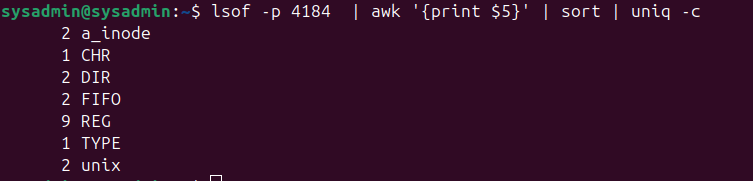
lsof to identify FD types leaking in a production service2. Kernel memory pressure masquerading as FD exhaustion
Even if your service closes files correctly, the kernel may:
- Keep stale sockets in TIME_WAIT
- Hold zombie connections
- Retain orphaned pipes
- Recycle epoll fds inefficiently
Common with:
- High-traffic APIs
- Long-lived WebSocket connections
- Busy HAProxy/Nginx servers
- Chat or streaming apps
This creates a feedback loop:
- High traffic → FD churn
- Kernel retains states
- FD table grows
- Memory pressure escalates
- FD allocation fails
- Application collapses
3. Systemd overrides undoing your tuned limits
Even if you set:
ulimit -n 65536
systemd might still enforce:
LimitNOFILE=1024
Check your unit:
systemctl show yourservice | grep LimitNOFILEWhy Standard Advice Fails (and causes production outages)
Most blogs recommend:
- “Increase the limit.”
- “Fix the code.”
- “Tune sysctl”
- “Restart the service.”
These band-aids fail at scale because:
1. The FD limit isn’t the root cause — the leak is
Raising limits only delays the crash.
2. Kernel pressure determines FD stability
Even a “fixed” application leaks during high traffic.
3. systemd and cgroups override almost everything
Many engineers forget that systemd ignores limits.conf.
4. FD exhaustion is often event-driven
Traffic spikes → new ephemeral sockets → death.
5. Observability tools don’t show FD leaks by default
CPU/RAM dashboards look perfect until it’s too late.
The Gotchas (3 things that go wrong in real production setups)
#1: lsof lies during high load
During bursts, lsof freezes or displays partial results.
Use:
cat /proc/<pid>/fd | wc -l
#2: systemd reloads ≠ new limits
systemctl daemon-reload doesn’t always apply FD changes until a full restart.
#3: File-max tuning without evaluating memory
Raising /proc/sys/fs/file-max Consumes kernel memory.
A misconfigured system can run out of RAM before hitting the new FD limit.
Practical Fixes (with real-world command examples)
These fixes are based on actual outages I’ve solved in production Linux and Kubernetes environments.
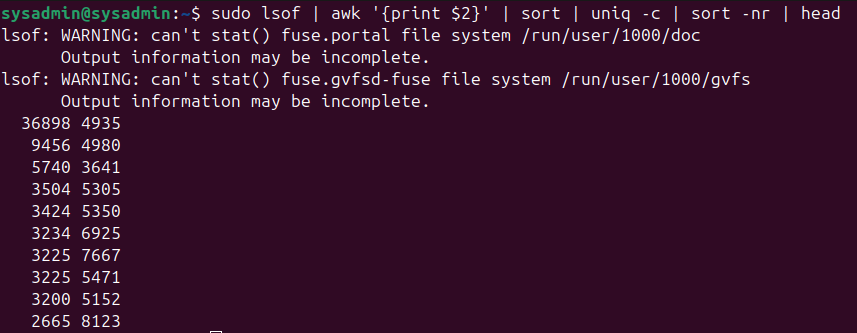
Step 1 — Identify which process is leaking FDs
sudo lsof | awk '{print $2}' | sort | uniq -c | sort -nr | head
Step 2 — Count FD types for leak analysis
lsof -p <pid> | awk '{print $5}' | sort | uniq -cStep 3 — Tune systemd the correct way
Edit:
/etc/systemd/system/myservice.service
Add:
LimitNOFILE=65536
Reload:
systemctl daemon-reload
systemctl restart myservice
Verify:
systemctl show myservice | grep LimitNOFILEStep 4 — Tune kernel for FD-heavy workloads
/etc/sysctl.conf:
fs.file-max = 2000000
net.ipv4.tcp_tw_reuse = 1
net.ipv4.tcp_fin_timeout = 30
Apply:
sysctl -pStep 5 — Find the root cause using fdinfo
ls -l /proc/<pid>/fd
If you see thousands of:
socket:[12345]anon_inode:[eventfd]pipe:[67890]- Repeated identical entries
…you found your leak.
Real-World Use Case: A Kubernetes API Gateway Leak
At a fintech company, a Go-based API gateway handled ~2M requests per hour.
Everything looked normal—CPU, RAM, network.
But every few hours it crashed with:
dial tcp: too many open files
Investigation showed:
- Stale TCP sockets in
CLOSE_WAIT
- FD count rising slowly (~200/hour)
- systemd limit set to
4096despite container ulimit being65536
Fixes:
- Patched the Go connection pool
- Increased LimitNOFILE
- Tuned TIME_WAIT reduction
Afterward, the service survived peak load without a single FD leak.
Lessons Learned
Across dozens of postmortems, senior engineers repeatedly discovered the same truths:
- FD leaks are usually invisible until too late.
- Raising limits without fixing leaks guarantees future outages.
- Observability stacks rarely track FD counts by default.
- systemd imposes stricter limits than engineers expect.
- Kernel pressure impacts FD stability far more than blogs mention.
These patterns are consistent across AWS EC2, GCP Compute, bare metal, and Kubernetes clusters.
FAQ — Fast Answers SysAdmins Actually Need
Usually, FD leaks, socket churn, systemd limit issues, or kernel memory pressure. Not just ulimit misconfiguration.
cat /proc/<pid>/fd | wc -l
No. It delays the failure unless you fix the underlying leak.
Because FD leaks are slow-burning and often invisible until traffic spikes.
Yes. Pods restart automatically, masking leaks until load is high.
FD exhaustion is one of those Linux problems that looks trivial—but in real production environments, it becomes a deep kernel and application-level challenge.
When your system hits too many open files Linux errors even though “everything looks normal,” it’s because the problem was never about limits—it was about visibility, kernel behavior, systemd overrides, and hidden descriptor leaks.
By analyzing FD patterns, tuning systemd and sysctl properly, and monitoring FD metrics, you can prevent outages that junior engineers often miss.
If you want to deepen your Linux SysAdmin or DevOps expertise, explore my recommended training paths on Udemy, or visit our curated recommendations page for courses focused on real-world SRE practices and production-grade troubleshooting.
Stay sharp, automate smartly, and debug deeply.