


Last Updated on 1 month ago by Sachin G
You can install Ansible on Linux with a single command. However, the command you choose decides which Ansible you actually get, and that is where most first setups break.
For example, a playbook that runs fine on a colleague’s laptop suddenly fails on a fresh Ubuntu 22.04 control node with couldn't resolve module/action. Similarly, dnf install ansible on a brand-new Rocky Linux server returns No match for argument: ansible. In both cases Ansible looked “installed”, yet the install method was the real problem.
This guide covers every method I use on production control nodes. First, you’ll install Ansible on RHEL, CentOS Stream, Rocky Linux and AlmaLinux with DNF and EPEL. Next, you’ll install it on Ubuntu 22.04, 24.04 and 26.04 with APT, the official PPA or pipx. Finally, you’ll pin specific versions, handle air-gapped servers, and run your first playbook against a real managed node.
If you’re completely new to Ansible, start with Ansible for Beginners tutorial series. It explains what Ansible is and how it works before you get hands-on.
Why Your Ansible Install Method Matters
Ansible ships in two forms, and mixing them up causes most “module not found” errors. Specifically, ansible-core contains the engine, the command-line tools and the ansible.builtin modules only. In contrast, the ansible community package bundles ansible-core with a large set of collections such as community.general and ansible.posix.
As a result, a playbook that uses community.general.ufw works with the full package but fails with core alone. Furthermore, each distribution packages these two forms differently, so the same command gives you different results on different servers.
What Each Distribution Gives You by Default
| Distribution | Default package source | What you get |
|---|---|---|
| RHEL, Rocky Linux, AlmaLinux 8.6+ and 9 | ansible-core in AppStream, full ansible in EPEL | Core only, unless you enable EPEL |
| RHEL, Rocky Linux, AlmaLinux 10 | ansible-core in AppStream, collections in EPEL | Core plus separately packaged collections |
| Ubuntu 22.04 LTS | ansible 2.10.7 in universe | Very old; many current modules missing |
| Ubuntu 24.04 LTS | ansible 9.2.0 in universe | ansible-core 2.16 plus collections |
| Ubuntu 26.04 LTS | ansible 13.1.0 in universe | Current release |
In other words, Ubuntu 22.04’s repository is the trap. It installs cleanly, ansible --version works, and then modern playbooks fail. Therefore, on 22.04 you should use the PPA or pipx instead.
Why pip install ansible Fails on Newer Ubuntu
Ubuntu 23.04 and later mark the system Python as externally managed under PEP 668. Consequently, sudo pip install ansible stops with an externally-managed-environment error. This protects APT-installed Python packages from being overwritten. Instead of forcing it with --break-system-packages, use pipx, which gives Ansible its own isolated environment.
Prerequisites and Choosing the Right Method
Before you start, make sure the control node meets these requirements:
- A supported Linux server or VM: RHEL, CentOS Stream, Rocky Linux or AlmaLinux 8, 9 or 10, or Ubuntu 22.04, 24.04 or 26.04 LTS
- A non-root user with sudo access
- Internet access, unless you follow the offline method
- SSH access to every server you plan to manage
- Python 3 on the managed nodes (all of the distributions above ship it by default)
Only the control node needs Ansible. The managed nodes need nothing extra, because Ansible connects over SSH and runs small Python modules there. That agentless design is the main reason Ansible is so easy to roll out.
Which Method Should You Use?
| Your situation | Use this method |
|---|---|
| Rocky Linux, AlmaLinux or CentOS Stream 8/9, want the full package | Method 1: DNF with EPEL |
| RHEL 8/9 with a subscription | Method 1: DNF with EPEL (RHEL steps) |
| Any RHEL-family 8.6+, 9 or 10, minimal footprint | Method 2: ansible-core from AppStream |
| Need an exact version for legacy playbooks | Method 3: pip in a virtual environment |
| Air-gapped server with no internet | Method 4: offline RPM install |
| Ubuntu 24.04 or 26.04, quick setup | Ubuntu Option 1: APT |
| Ubuntu 22.04 or 24.04, want the latest stable | Ubuntu Option 2: official PPA |
| Ubuntu, need an exact version | Ubuntu Option 3: pipx |
In production, I default to the distribution package for stability. Then I switch to a pinned version only when a project’s playbooks demand it.
Install Ansible on RHEL, CentOS Stream, Rocky Linux and AlmaLinux
On RHEL-family systems, DNF is the package manager. On EL 8 and later, yum is simply an alias for dnf, so older commands still work. However, CentOS 7 reached end of life in June 2024, so avoid it for new control nodes.
Method 1: Install the Full Ansible Package with DNF and EPEL
EPEL (Extra Packages for Enterprise Linux) is a Fedora-maintained repository. It provides the full ansible package on EL 8 and 9, including the community collections.
On Rocky Linux, AlmaLinux and CentOS Stream 8/9:
sudo dnf install -y epel-release
sudo dnf install -y ansible

On RHEL 8/9 with an active subscription:
The epel-release package is not in Red Hat’s own repositories. Instead, enable CodeReady Builder and install the EPEL release RPM directly from Fedora, as the official EPEL documentation describes. Replace 9 with 8 on RHEL 8.
sudo subscription-manager repos --enable codeready-builder-for-rhel-9-$(arch)-rpms
sudo dnf install -y https://dl.fedoraproject.org/pub/epel/epel-release-latest-9.noarch.rpm
sudo dnf install -y ansible
Warning: Red Hat does not support EPEL packages. If you need vendor support for Ansible on RHEL, use Red Hat Ansible Automation Platform instead.
Method 2: Install ansible-core from AppStream (No EPEL)
On EL 8.6+, 9 and 10, the ansible-core package sits in the default AppStream repository. As a result, you can install it without adding any third-party repository:
sudo dnf install -y ansible-coreThis gives you the engine and the ansible.builtin modules only. Therefore, install the collections your playbooks need with ansible-galaxy:
ansible-galaxy collection install community.general ansible.posixThis is also the standard route on EL 10. At the time of writing, EPEL 10 ships individual collection packages such as ansible-collection-community-general rather than one full ansible package.
Method 3: Install a Specific Ansible Version with pip
Sometimes you need an exact Ansible version, for example to match a CI pipeline or to keep older playbooks running. Most RHEL-family repositories carry only one version, so pip inside a virtual environment gives you full version control without touching the system Python or DNF-managed packages.
Check your Python version first, because it decides which Ansible you can install:
python3 --versionOn EL9 the default python3 is 3.9. ansible-core 2.16 and later need Python 3.10 or newer on the control node, so on the default Python the newest version you can pin is ansible 8.x (ansible-core 2.15). If you need something newer, use Option B.
Option A: Default Python 3.9 (RHEL, Rocky, AlmaLinux 9)
python3 -m venv ~/ansible-venv
source ~/ansible-venv/bin/activate
pip install --upgrade pip
pip install "ansible==8.7.0"
Option B: Newer Ansible with Python 3.12
sudo dnf install -y python3.12
python3.12 -m venv ~/ansible-venv
source ~/ansible-venv/bin/activate
pip install --upgrade pip
pip install "ansible==<version-you-need>"
Replace <version-you-need> with the version your playbooks require.
Verify that the pinned version is the one you are running:
which ansible
ansible --version
The executable path should point inside ~/ansible-venv/bin/. If it shows /usr/bin/ansible, the virtual environment is not active.
Legacy Ansible 2.9
For old 2.9 playbooks, pip install "ansible==2.9.27" still installs on Python 3.9. Ansible 2.9 has been end-of-life since 2022 and receives no security fixes, so use it only to keep an old pipeline running while you migrate the playbooks to a current version.
Remember to run source ~/ansible-venv/bin/activate in every new terminal session before you use the pinned version. Run deactivate to return to the system Ansible.
Method 4: Install Ansible Without Internet (Offline)
Air-gapped servers need the RPMs carried in by hand. First, on a connected machine running the same OS release with EPEL enabled, download Ansible and every dependency:
sudo dnf install -y dnf-plugins-core
mkdir ~/ansible_pkgs
dnf download --resolve --alldeps --destdir ~/ansible_pkgs ansible
tar -czvf ansible_pkgs.tar.gz -C ~ ansible_pkgs
The --alldeps flag matters here. Without it, DNF skips dependencies that are already installed on the download machine, and the offline install then fails on missing packages.
Then copy the archive to the offline server, extract it and install from the local files only:
tar -xzvf ansible_pkgs.tar.gz
sudo dnf install -y --disablerepo='*' ./ansible_pkgs/*.rpm
The --disablerepo='*' option stops DNF from trying to reach repositories it cannot access, which otherwise causes long timeouts.
Install Ansible on Ubuntu 22.04, 24.04 and 26.04 LTS
On Ubuntu, APT replaces DNF, and there is no EPEL. Instead, you choose between Ubuntu’s own repository, the official Ansible PPA and pipx. Your Ubuntu release decides which option makes sense.
Option 1: Install Ansible from the Ubuntu Repository
sudo apt update
sudo apt install -y ansible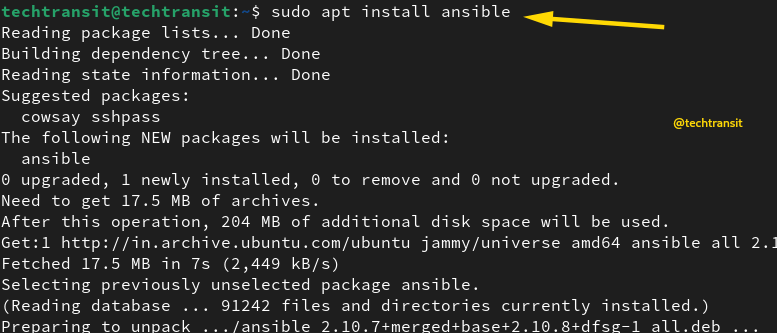
This is the right choice on Ubuntu 24.04 and 26.04, because their repositories carry Ansible 9.2.0 and 13.1.0 respectively. On Ubuntu 22.04, however, you get the 2.10 line, which is too old for most current playbooks.
Option 2: Install the Latest Ansible from the Official PPA
The Ansible community maintains a PPA with the current stable release for supported Ubuntu LTS versions. Use it on 22.04 and 24.04 when you want the newest Ansible through APT:
sudo apt update
sudo apt install -y software-properties-common
sudo add-apt-repository --yes --update ppa:ansible/ansible
sudo apt install -y ansible
The software-properties-common package provides the add-apt-repository command. Minimal VPS images often leave it out, so install it first.
Note for Ubuntu 26.04: At the time of writing, the PPA has not published builds for 26.04, and
add-apt-repositoryfails with “does not have a Release file” (PPA issue #128). You don’t need it there anyway, because the 26.04 repository already ships a current release.
[New screenshot: install-ansible-ubuntu-ppa.png] Alt text: Screenshot by TechTransit.org: adding the official Ansible PPA on Ubuntu Caption: TechTransit.org | Add the Ansible PPA for the latest stable release
Option 3: Install a Specific Ansible Version with pipx
As explained earlier, plain pip install is blocked on newer Ubuntu releases. Therefore, use pipx to install Ansible from PyPI into its own isolated environment:
sudo apt install -y pipx
pipx ensurepath
pipx install --include-deps ansible
To pin an exact version, for example to match an existing playbook set, add the version number:
pipx install --include-deps ansible==9.2.0After pipx ensurepath, open a new terminal session so the ansible commands appear on your PATH. Additionally, pipx installs per user, so each admin account on the control node gets its own copy.
[New screenshot: install-ansible-ubuntu-pipx.png] Alt text: Screenshot by TechTransit.org: installing Ansible with pipx on Ubuntu Caption: TechTransit.org | Install a pinned Ansible version with pipx
Verify the Ansible Installation
Whichever method you used, confirm the result before you write any playbooks:
ansible --versionExample output from a Rocky Linux 9 control node:
ansible [core 2.14.18]
  config file = /etc/ansible/ansible.cfg
  configured module search path = ['/root/.ansible/plugins/modules', '/usr/share/ansible/plugins/modules']
  ansible python module location = /usr/lib/python3.9/site-packages/ansible
  ansible collection location = /root/.ansible/collections:/usr/share/ansible/collections
  executable location = /usr/bin/ansible
  python version = 3.9.21 (main, Jun 27 2025, 00:00:00) [GCC 11.5.0 20240719 (Red Hat 11.5.0-5)]
  jinja version = 3.1.2
  libyaml = True
Check three lines in particular:
ansible [core x.y.z]shows the engine version. Compare it against what your playbooks require.config fileshows whichansible.cfgis active. A value ofNoneis normal after a PPA or pipx install, because no config file exists yet.executable locationshows where the binary lives. If it points somewhere unexpected, you probably have two installations on the same machine.
To see which collections came with your installation, run ansible-galaxy collection list. An empty or short list usually means you installed ansible-core only.
After You Install Ansible on Linux: Run Your First Playbook
The next steps are identical on every distribution above. Specifically, you will set up SSH keys, create an inventory, test the connection and run a real playbook.
Step 1: Set Up SSH Key Authentication
On the control node, generate a key and copy it to a managed node:
ssh-keygen -t ed25519 -C "ansible-control"
ssh-copy-id deploy@192.168.1.15
ssh deploy@192.168.1.15
Replace deploy with the user Ansible should log in as. If the last command logs you in without a password prompt, key authentication works.
Step 2: Create a Project Directory and Inventory
Instead of editing the global /etc/ansible/hosts, keep an inventory inside each project. This approach needs no sudo, fits neatly into Git, and works the same with every install method. Moreover, pipx installs never create /etc/ansible at all.
mkdir -p ~/ansible-lab && cd ~/ansible-labCreate inventory.ini:
[webservers]
192.168.1.15
192.168.1.16
[dbservers]
192.168.1.21
[all:vars]
ansible_user=deploy
Then create ansible.cfg in the same directory, so Ansible picks up the inventory automatically:
[defaults]
inventory = ./inventory.ini
Groups such as webservers and dbservers let you target a whole tier with one command. For static, dynamic and YAML formats, see the Ansible Inventory Tutorial.
Step 3: Test Connectivity with the Ping Module
ansible all -m ansible.builtin.pingA successful reply looks like this:
192.168.1.15 | SUCCESS => {
    "changed": false,
    "ping": "pong"
}
Note that this is not an ICMP ping. Instead, the module logs in over SSH and runs a small Python check. Consequently, pong confirms that SSH, authentication and Python all work on that host.
[New screenshot: ansible-ping-module-pong.png] Alt text: Screenshot by TechTransit.org: Ansible ping module returning pong from managed nodes Caption: TechTransit.org | Test SSH and Python connectivity with the ping module
Step 4: Write and Run Your First Playbook
Create install_nginx.yml:
- name: Install and start NGINX on web servers
  hosts: webservers
  become: true
  tasks:
    - name: Refresh APT cache (Ubuntu/Debian only)
      ansible.builtin.apt:
        update_cache: true
        cache_valid_time: 3600
      when: ansible_facts['os_family'] == 'Debian'

    - name: Install NGINX
      ansible.builtin.package:
        name: nginx
        state: present

    - name: Ensure NGINX is running and enabled at boot
      ansible.builtin.service:
        name: nginx
        state: started
        enabled: true
First, do a dry run to see what would change. Then apply it:
ansible-playbook install_nginx.yml --check
ansible-playbook install_nginx.yml
If your remote user needs a password for sudo, add -K (--ask-become-pass).
The ansible.builtin.package module picks APT or DNF automatically, so the same playbook works across a mixed Ubuntu and RHEL fleet. Meanwhile, the APT cache task matters on fresh Ubuntu VPS images, where empty package lists make installs fail with “No package matching”. The when condition relies on gathered facts, which How to Use the Ansible Setup Module explains in detail.
[New screenshot: ansible-playbook-install-nginx.png] Alt text: Screenshot by TechTransit.org: running a first Ansible playbook to install NGINX Caption: TechTransit.org | Run your first playbook against the webservers group
Gotchas That Trip Up Real Installations
These five problems break real installations. The first three come straight from my own setups.
Forgetting EPEL on Rocky Linux and AlmaLinux
The most common failure on RHEL-family servers is No match for argument: ansible. It happens because the full ansible package lives in EPEL, not in the default repositories. Therefore, either enable EPEL first (Method 1) or install ansible-core instead (Method 2). Similarly, on EL 10 the full package isn’t in EPEL at all, so ansible-core plus collections is the way to go.
add-apt-repository Missing on a Minimal Ubuntu VPS
During testing on a minimal Ubuntu VPS, add-apt-repository failed outright with “command not found”. Not every Ubuntu image comes ready for PPAs. As a result, always install software-properties-common before you add the Ansible PPA.
SSH Key Mismatch Behind a Vague Unreachable Error
Inconsistent SSH keys caused UNREACHABLE! errors that Ansible’s own message didn’t explain. However, a plain verbose SSH test showed exactly which key the client offered and which one the server rejected:
ssh -vv deploy@192.168.1.15In short, debug SSH first, then debug Ansible. If plain SSH fails, no Ansible setting will fix it.
Check Mode Fails on a Service That Isn’t Installed Yet
On a fresh server, --check can fail at the NGINX service task with “Could not find the requested service”. This happens because check mode reports the package install without performing it. Consequently, the service doesn’t exist yet when the next task runs. The real run works fine; in other words, treat this specific dry-run error as expected on first deployment.
Offline Installs Missing Dependencies
If you download RPMs with --downloadonly on a machine that already has some dependencies, DNF skips them. Then the air-gapped install fails on packages you never copied. For this reason, use dnf download --resolve --alldeps on a machine running the same OS release, as shown in Method 4.
“Always match your Ansible version with the environment’s requirements. Installing the latest version isn’t always the best choice for production stability.” — Sachin, TechTransit.org
Best Practices for a Production Ansible Control Node
Installing Ansible takes minutes. Keeping it predictable over years takes a few habits:
- Pin versions per project. Record the Ansible version in a
requirements.txtand the collections in arequirements.yml. Then every admin and every CI runner uses the same versions. - Keep config in the project. Put
ansible.cfgand the inventory next to the playbooks instead of in/etc/ansible. As a result, the whole setup lives in Git and moves with the code. - Never run day-to-day work as root. Use a regular user with sudo on the control node, and
become: truein playbooks only where privilege is needed. - Dry-run before every change. Run
--check --diffagainst production first, so you see exactly which files and packages would change. - Lint your playbooks. Install
ansible-lintand run it before commits. It catches deprecated modules and risky patterns early. - Use one install method per machine. Mixing a DNF install with a pip or pipx install on the same control node leads to two
ansiblebinaries and confusing version mismatches. - Upgrade deliberately. Test new Ansible releases against a staging inventory first. Furthermore, read the porting guide for each major version before you upgrade production.
In practice, these habits matter more than the install method itself. When you install Ansible on Linux for a team, consistency beats having the newest release.
When something does go wrong, How to Troubleshoot and Debug Ansible Playbooks Using ansible.builtin.debug walks through the debugging workflow.
FAQ: Installing Ansible on Linux
On Rocky Linux, AlmaLinux and CentOS Stream 8/9, run sudo dnf install -y epel-release and then sudo dnf install -y ansible. On Ubuntu 24.04 or 26.04, sudo apt install -y ansible is enough, because their repositories carry recent releases. However, on Ubuntu 22.04 the repository version is too old, so use the official PPA instead. In every case, finish with ansible --version to confirm the result.
The ansible-core package contains the engine, the command-line tools and the built-in modules. In contrast, the ansible package adds a large bundle of community collections on top. Consequently, playbooks that use modules like community.general.ufw need either the full package or those collections installed separately. You can add collections to a core install at any time with ansible-galaxy collection install.
Yes, partly. RHEL 8.6+, 9 and 10 include ansible-core in the AppStream repository. However, the full ansible package with collections comes from EPEL, which Red Hat doesn’t support. For a fully supported setup, Red Hat offers Ansible Automation Platform under a separate subscription.
Ubuntu 23.04 and later mark the system Python as externally managed under PEP 668. Therefore, a system-wide pip install stops with an externally-managed-environment error. Instead, use pipx install --include-deps ansible, which creates an isolated environment just for Ansible. Alternatively, create your own virtual environment with python3 -m venv and install Ansible inside it.
No. Only the control node needs Ansible. Managed nodes need SSH access and Python 3, which every distribution in this guide includes by default. Ansible copies small modules over SSH, runs them, and then removes them.
Not natively. Windows can be a managed node, but the control node must run on Linux or macOS. On a Windows workstation, install Ubuntu under WSL and then follow the Ubuntu steps in this guide.
Conclusion
The right way to install Ansible on Linux depends on your distribution and your playbooks. Use DNF with EPEL on RHEL-family systems, ansible-core from AppStream for a minimal footprint, and APT, the PPA or pipx on Ubuntu. Then verify the version, test connectivity with ping, and dry-run every playbook before production.
To keep learning, work through the Ansible Tutorials for Beginners series, or browse the recommended Ansible courses.
Need Ansible automation for your servers? I set up control nodes, write production playbooks and automate RHEL and Ubuntu fleets. Work with me on Upwork .