


Last Updated on 4 hours ago by Sachin G
Applies to: WordPress on a CloudPanel VPS (Ubuntu 22.04 per the hosting panel,not checked on the shell), Varnish in front of Nginx, Cloudflare in front of that. Plugin versions confirmed on the server: WP-Optimize 4.6.1, LiteSpeed Cache 7.9.1. October 2026.
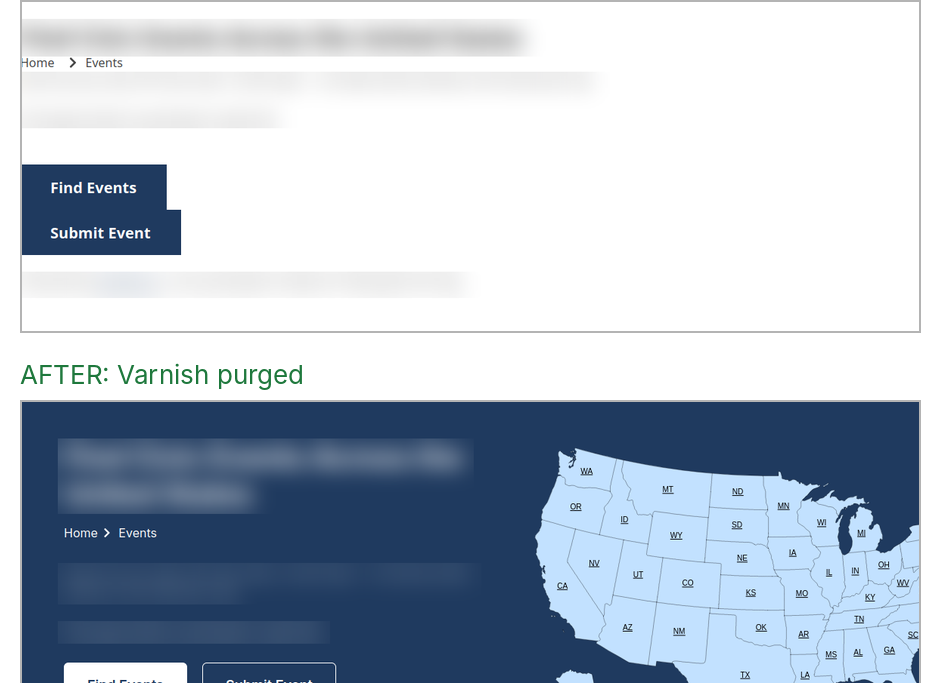
This is what I saw on a client’s WordPress site after I cleared a plugin’s cache folder. The page returned 200, its cached copy was 129067 seconds old, and one stylesheet it linked to was gone
== /events-page/
HTTP/2 200
x-cache-age: 129067
cf-cache-status: DYNAMIC
404  https://example.com/wp-content/cache/wpo-minify/1789554932/assets/wpo-minify-header-elementor-post-1
I had switched off WP-Optimize because its minify cache kept leaving a “not allowed to save its cache” comment in the page source, and then I deleted its cache folder. A few minutes later the homepage looked normal but the inner pages had no styling at all, in Firefox and in Chrome, private windows included. When WordPress CSS goes missing after a cache clear, the browser is rarely the problem.
My mistake was the order. I deleted the files and never told Varnish, the HTTP cache that sits in front of Nginx and hands out saved copies of pages. It kept serving an old copy that linked to a stylesheet I’d just removed.
Short answer: purge Varnish after you delete or regenerate any cache files. Then fix the reason nothing purged on its own. Here that meant installing the CLP Varnish Cache plugin so a save in wp-admin purges, and cutting the cache lifetime from 7 days to 24 hours.
1. Which cache plugins are active, and is anything left over from WP-Optimize? (wpt is my shell function for wp --allow-root --path="$WP", where $WP is the WordPress folder.)
wpt plugin list --format=table | grep -iE "optimize|litespeed|cache|redis|varnish"litespeed-cache active none 7.9.1 off
wp-optimize inactive available 4.6.1 4.7.0 off
object-cache.php dropin offThen I checked for leftover drop-ins. If advanced-cache.php existed, it could still be intercepting requests:
ls -l "$WP/wp-content/advanced-cache.php" "$WP/wp-content/object-cache.php" 2>&1advanced-cache.php didn’t exist. object-cache.php was LiteSpeed Cache’s drop-in, not WP-Optimize’s.
2. Does anything tell Varnish to purge? I looked for a Varnish plugin, a must-use plugin and the ClpVarnish class name:
wpt plugin list --format=table | grep -iE "varnish|clp|cloudpanel"
ls "$WP/wp-content/mu-plugins" 2>/dev/null
grep -rl "ClpVarnish" "$WP/wp-content/plugins" "$WP/wp-content/mu-plugins" 2>/dev/null | head
Nothing came back from any of the three. That was the first sign the problem was bigger than one folder. Then I touched the homepage post (ID 41) without changing it and watched the cache age on port 6081, where Varnish listens:
V() { curl -sI -H "Host: example.com" http://127.0.0.1:6081/ | grep -iE "^(x-varnish|age|x-cache-age)"; }
V; V
wpt post update 41 --post_title="$(wpt post get 41 --field=post_title)"
sleep 2; V
X-Cache-Age: 156672
X-Cache-Age: 156672
Success: Updated post 41.
X-Cache-Age: 156687The age kept growing. Nothing had purged. The header on this setup is X-Cache-Age , not
the usual Age , so I’d grepped for the wrong thing at first.
Then the broken pages showed up, and I ran the check that found the 404. It prints the
headers of three pages and any stylesheet that doesn’t return 200:
for u in / /events-page/ /submit-event/; do
  echo "== $u"
  curl -s -D- -o /dev/null "https://example.com$u" | grep -iE "^(HTTP|cf-cache-status|x-cache-age|age)"
  curl -s "https://example.com$u" | grep -oE 'https://example.com/[^"'"'"' ]+\.css[^"'"'"' ]*' | sort -u | while read -r f; do
    printf "%s  %s\n" "$(curl -s -o /dev/null -w '%{http_code}' "$f")" "${f:0:110}"
  done | grep -v '^200'
done
== /
HTTP/2 200
x-cache-age: 157043
cf-cache-status: DYNAMIC
== /events-page/
HTTP/2 200
x-cache-age: 129067
cf-cache-status: DYNAMIC
404 https://example.com/wp-content/cache/wpo-minify/1789554932/assets/wpo-minify-header-elementor-post-1
== /submit-event/
HTTP/2 200
x-cache-age: 0
cf-cache-status: DYNAMICI asked myself if Cloudflare was to blame. cf-cache-status: DYNAMIC says Cloudflare isn’t caching these pages, so no. The homepage had a 157043-second-old copy too, but its stylesheets all still existed. /submit-event/ shows an age of 0 because the Varnish rules on this site never cache it.
Why does the CSS disappear after I clear a cache folder?
A minify plugin writes combined CSS into a numbered folder, and the page HTML links to those exact file names. If you delete the folder, any saved copy of the page that still links to it breaks. Varnish saved the HTML, so Varnish kept pointing at files that were gone.
The trigger was mine: the files under wp-content/cache/wpo-minify/<number>/assets/ no longer existed. The cause was deeper. Varnish was keeping pages for 604800 seconds (7 days), and nothing in WordPress told it when a page or its files changed. The homepage looked fine because its copy happened to link to files that were still there. The broken page had a copy 129067 seconds old, about 36 hours.
That’s why “clear the cache” is slippery advice on a server with several cache layers. I cleared the plugin’s layer and left the one in front of it alone.
How do I fix it, step by step?
Purge Varnish by its cache tag first to get the site back, then install a plugin that purges on save, then shorten the cache lifetime. Back up the Varnish settings file before the last step. The purge itself is safe: the cache just refills.
1. Purge Varnish. This sends a PURGE request with the site’s cache tag, so Varnish drops every saved page for the site. (abcd stands in for the real tag. It shows up in the X-Cache-Tags response header, for example abcd,abcd-post-41.)
curl -s -o /dev/null -w "purge: %{http_code}\n" -X PURGE -H "X-Cache-Tags: abcd" http://127.0.0.1:6081/After that, x-cache-age was 0 on all three pages and they loaded properly after a refresh. About 4 to 5 minutes passed between the first report and this fix.
2. Install CLP Varnish Cache. In wp-admin go to Plugins, Add New, search “CLP Varnish Cache”, then Install Now and Activate. If it causes trouble, deactivate it and you’re back where you started. The settings page already had the right values for this server: Varnish server 127.0.0.1:6081, cache tag prefix abcd, and an excludes list that includes ^/events/.
3. Shorten the cache lifetime. Seven days is a long time to keep a broken page if a purge is ever missed. I back up the settings file first:
S=/home/siteuser/.varnish-cache/settings.json
cp -a "$S" /root/backups/varnish_settings_before_A7_$(date +%Y%m%d_%H%M).json
grep -n cacheLifetime "$S"3. Shorten the cache lifetime. Seven days is a long time to keep a broken page if a purge is ever missed. I back up the settings file first:
In the plugin, I changed Cache Lifetime from 604800 to 86400 and saved. Then I diffed the file against the backup, so I’d know nothing else changed:
B=$(ls -t /root/backups/varnish_settings_before_A7_*.json | head -1)
diff <(python3 -m json.tool "$B") <(python3 -m json.tool "$S") && echo "NO CHANGE" || echo "^ differences above"
5c5
< "cacheLifetime": "604800",
---
> "cacheLifetime": "86400",Only that line changed. Rollback: set Cache Lifetime back to 604800 in the plugin, save, and purge again. The backup copy of settings.json is there if you need to compare.
How do I verify the fix?
Test a save in wp-admin, not only from the command line. After a save, the page’s x-cache-age should drop to 0 or a few seconds and then climb again, which means Varnish dropped the old copy and cached the new one.
I saved a different page in wp-admin first, and the homepage’s age went from 208 to 0. Then I opened the homepage in the editor, clicked Update, and ran this straight after:
V() { curl -sI -H "Host: example.com" http://127.0.0.1:6081/ | grep -iE "^x-cache-age"; }
V; sleep 6; V; sleep 6; V
X-Cache-Age: 0
X-Cache-Age: 6
X-Cache-Age: 120, 6, 12 is the pattern you want: rebuilt, then cached again and ageing. A header check on the lifetime also showed the new value, X-Cache-Lifetime: 86400.Tool i used is HTTP header checker .
For the whole site I re-ran my baseline against the origin on port 8080 (a loop of curl calls plus a grep for the plugin’s “ERROR:” comment). One run:
/  200  0.806755s
/events/  200  0.826796s
/submit-event/  200  0.893359s
0
All three pages returned 200, and the error comment count was 0. Before, it was 1. It’s a single run, so I won’t claim the timings as a speed-up.
Gotchas that cost me time
Three things bit me, and none of them is obvious from the plugin’s description.
- A WP-CLI save does not purge.
wp post updatechanged the post and the cache age kept climbing. I also watched Varnish for PURGE requests while updating from the command line and saw none (varnishlog -g request -q 'ReqMethod eq "PURGE"'printed nothing). Saving in wp-admin did purge. I didn’t trace which hook does it: a grep of the plugin only showed plugin, theme and upgrade events. After any change you make from the shell, purge by hand. - The header is
X-Cache-Age. If you grep forAgeorX-Varnishon this setup, you’ll see nothing and think the cache is off. wp cache flushmay hit other sites. My helper function ran it on every clean-up. This server’s Redis has one database,db0, with 636 keys, and the site’s object cache was configured ondb0. Other sites on the box probably share it, so a flush likely emptied their object cache too. That part is my inference, not something I confirmed. I took the command out of the helper.
What did I deliberately leave alone?
- WP-Optimize stays off. LiteSpeed Cache’s own minify and combine options were all empty when I read them (
optm-css_min,optm-css_comb,optm-js_min,optm-js_combandoptm-html_min), so nothing minifies CSS or JS right now. That’s the stable state. If I turn minify on later, it’ll be in LiteSpeed only, one option at a time, with a Varnish purge after each. - No hand-edited
settings.json. The plugin wrote it, and the diff proved it changed one line. - No Cloudflare changes.
DYNAMICmeant it had nothing cached to clear. - 24 hours, not 7 days. The plugin now purges on save, which makes the lifetime a second safety net instead of the main control. I chose the official plugin before writing my own purge snippet, and the snippet stayed a fallback I didn’t need.
Common errors
The one real error in this job was Command 'base' not found, did you mean: .... I’d opened a fresh terminal, so my base and after helper functions were gone. Define them again in the new shell and re-run the check.
How do I prevent it?
- Purge Varnish right after you delete or regenerate cache or minify files.
- Install a plugin that purges Varnish on save, and test it from wp-admin and from WP-CLI. They don’t behave the same.
- Keep the Varnish lifetime short enough that a missed purge doesn’t hurt for days. I use 86400 seconds here.
- Run one minify plugin at a time, and tell the site owner not to switch another on without a heads-up.
- Avoid
wp cache flushon a server where several sites share one Redis database. - Read each page’s
x-cache-agebefore and after a change. It takes ten seconds.
Cache layers don’t know about each other. Whatever you delete behind Varnish, you have to tell Varnish. On this site, that now happens when someone saves in wp-admin, and I still purge by hand after anything done from the shell.