


Last Updated on 6 minutes ago by Sachin G
Who this guide is for
This guide shows which Hostinger VPS plan fits which job, and what each one costs once the first term ends.
Disclosure: I’m a Hostinger partner. If you buy through my link or code, I earn a commission and you pay nothing extra. I’m an independent partner, not Hostinger, so I’ll also say where I’d pick a different host.
Want to check the current prices first? Open Hostinger’s VPS plans here and compare them with the tables below. If you’re a new Hostinger customer, my code WEBSTART applies to your first purchase. It doesn’t apply to renewals or to accounts that already exist. Come back to this page before you pay, because the renewal price matters more than the first one.
Short answer: KVM 2 is the right starting plan for most people running n8n, small Docker stacks or a few WordPress sites. But don’t judge any plan by its first-term price. Renewal runs roughly 1.7 to 2.2 times higher (my calculation, 10 November 2026), so budget for the renewal rate from day one.
I’ve set up many of these servers for clients: WordPress and WooCommerce, n8n, Docker Compose stacks and self-hosted AI. Almost every buyer asks the same two things. Which plan do I need, and what will it cost me in year three? This page answers both. It also shows the tests I ran, and it lists the cases where I’d send you somewhere else.
Which plan fits which job
Start with KVM 2 unless your workload is clearly smaller or heavier. This is how I size it, using the plan specs Hostinger lists (data as of 10 November 2026, source: Hostinger VPS plans page). It is my judgement, not a benchmark result.
| Your project | Start with | Why |
|---|---|---|
| Learning Linux, one small app, a test server | KVM 1 (1 vCPU, 4 GB RAM) | Cheapest way to get root access. You’ll outgrow it as soon as you add a database. |
| n8n, a few Docker containers, 2 to 5 small WordPress sites | KVM 2 (2 vCPU, 8 GB RAM) | Enough memory to run a database next to your apps without swapping. |
| Ollama with small models, heavier Docker stacks, a busy WordPress site | KVM 4 (4 vCPU, 16 GB RAM) | Models and caches eat RAM. CPU-only inference is slow, so keep expectations modest. |
| Large WooCommerce store, constant high CPU, many concurrent users | Not a VPS from Hostinger by default | Read the section on when I’d choose another host before you buy. |
KVM 8 (8 vCPU, 32 GB RAM) exists. If you think you need it, test sustained load first (see my tests below), because that’s where bigger plans are most often questioned.
Hostinger VPS plans, prices and renewal rates
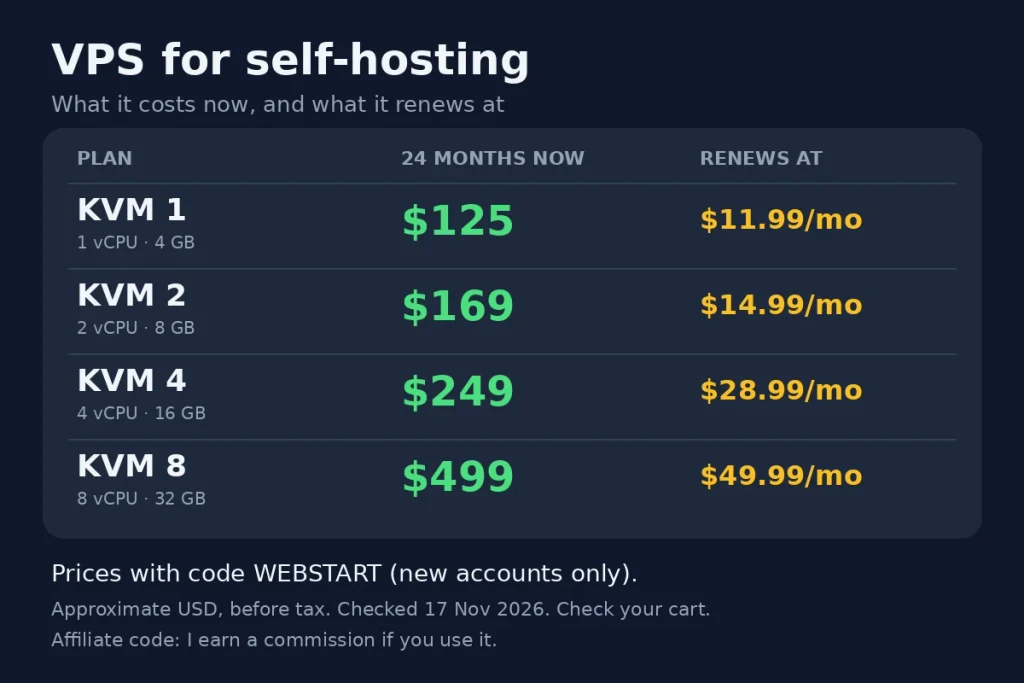
The four plans differ mainly in vCPU and RAM. The 24-month price is what you pay first. The renewal rate is what you pay from month 25 on.
| Plan | vCPU / RAM / NVMe / bandwidth | 24 months (sale price) | 24 months with code WEBSTART (new accounts) | Renewal per month |
|---|---|---|---|---|
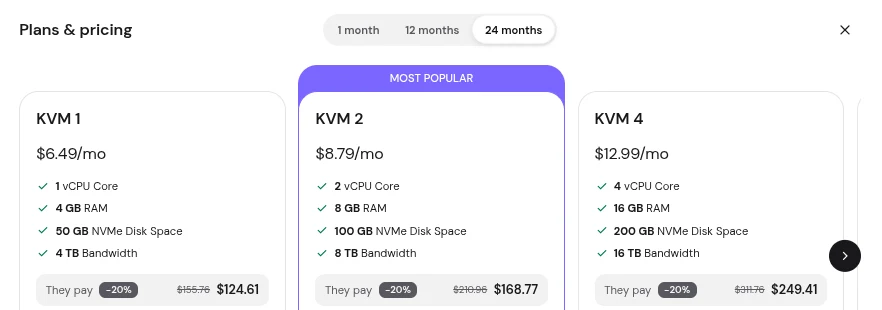
| KVM 1 | 1 / 4 GB / 50 GB / 4 TB | $155.76 | about $124.61 | $11.99 |
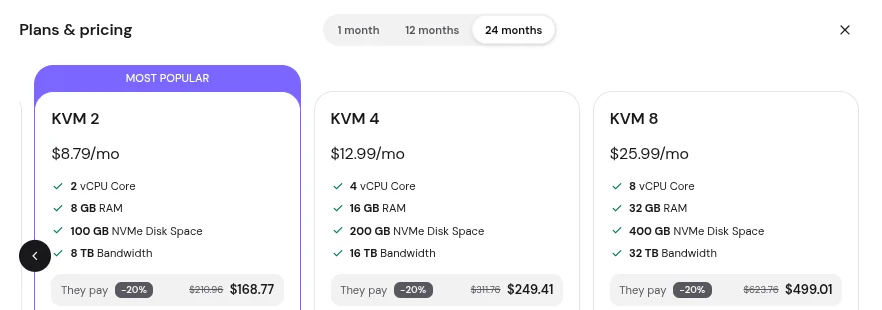
| KVM 2 | 2 / 8 GB / 100 GB / 8 TB | $210.96 | about $168.77 | $14.99 |
| KVM 4 | 4 / 16 GB / 200 GB / 16 TB | $311.76 | about $249.41 | $28.99 |
| KVM 8 | 8 / 32 GB / 400 GB / 32 TB | $623.76 | about $499.01 | $49.99 |
Prices I checked on 17 November 2026
Data as of 17 November 2026. Source: Hostinger’s VPS plans page and my Hostinger partner dashboard (screenshots below). Prices are in USD, before tax. Hostinger changes prices and runs sales often, so confirm the final amount in your cart before you pay.
The code column only applies to a new Hostinger account on its first purchase.It never applies to a renewal, so I explain the rules further down.
What these plans really cost over three years
Over 36 months, KVM 2 averages about $9.68 a month with the code and $10.86 without it. KVM 4 averages about $16.59 and $18.32. In other words, the gap between the first-term price and these averages is the renewal.
| Plan | Months 1 to 24 (with code) | Year 3 at renewal (12 months) | 3-year total with code | 3-year total without code |
|---|---|---|---|---|
| KVM 1 | $124.61 | $143.88 | $268.49 | $299.64 |
| KVM 2 | $168.77 | $179.88 | $348.65 | $390.84 |
| KVM 4 | $249.41 | $347.88 | $597.29 | $659.64 |
These totals are my own calculation from the table above, as of 10 November 2026. I assumed a 12-month renewal at the monthly renewal rate from the table above. If your renewal quote differs, use the number in your own account.
Three things I’d do with this:
- Pick the term by how long the project will live. 24 months gives the lowest monthly price, but only if you’ll still be running the server in month 24. If the project might end in a year, a shorter term costs less up front.
- Put the renewal date in your calendar now. Set a reminder about 60 days before it.
- Compare before you renew. At that point, check the renewal quote against the current price of a new plan. A move takes a few hours if you’ve documented your setup, and sometimes it saves real money.
What I tested, and what I won’t claim
I ran the same short tests on one plan, KVM 4 (I haven’t tested the others): CPU speed, disk speed and ten minutes of sustained load. Test data as of 17 November 2026 (UTC), measured by me on a Hostinger KVM 4 server. They describe that server on that day. They aren’t a promise about yours.
| Test | KVM 2 | KVM 4 |
|---|---|---|
| CPU, one thread (sysbench events per second) | not tested | 5,401 |
| CPU, all threads (sysbench events per second) | not tested | 21,667 (4 threads, scaling 4.0 times) |
| Disk, 4k random read/write mix (fio IOPS) | not tested | Read 60,100 IOPS, write 25,800 IOPS (direct I/O, 70/30 mix, 60 seconds) |
| Sustained CPU: first minute vs the end of the test (events per second, all threads) | not tested | Minute 1: 21,695. Minute 9: 21,718. Whole 10 minutes: 21,683 |
| Highest CPU steal during the sustained test (vmstat st column) | not tested | 0 (vmstat ran during the whole sustained test) |
| Ollama speed | not tested | not tested |
Commands to repeat the tests
Here are the exact commands, so you can repeat the test on your own server. Run them on a fresh server with nothing else running.
# Install the test tools (Ubuntu or Debian)
sudo apt-get update && sudo apt-get install -y sysbench fio

# Record the test environment and a UTC timestamp (keep this output as proof)
date -u
hostnamectl
lscpu | grep -E 'Model name|^CPU\(s\)|Thread'
free -h
df -h /

# CPU: one thread, then all threads, 30 seconds each
sysbench cpu --threads=1 --time=30 run
sysbench cpu --threads=$(nproc) --time=30 run

# Disk: 4k random read/write mix for 60 seconds
fio --name=randrw --ioengine=libaio --rw=randrw --rwmixread=70 --bs=4k \
    --size=1G --direct=1 --iodepth=32 --runtime=60 --time_based --group_reporting

# Sustained CPU: 10 minutes, one report per minute, watch for a drop
sysbench cpu --threads=$(nproc) --time=600 --report-interval=60 run


# Sustained CPU for 10 minutes, with vmstat recording in the background
vmstat 5 125 > vmstat-under-load.txt &
sysbench cpu --threads=$(nproc) --time=600 --report-interval=60 run
wait
# Highest steal value seen during the test
awk 'NR>3 && $NF ~ /^[0-9]+$/ {if ($NF>m) m=$NF} END {print "Highest steal (st):", m+0}' vmstat-under-load.txt
Some reviewers report big slowdowns on larger plans under sustained load.However, one server can’t confirm or dismiss that, so I included the ten-minute test.Then compare minute 1 with minute 10. A large drop, or steal time that stays high, tells you the plan won’t suit a busy workload.My test server ran Ubuntu 22.04. The setup steps further down are written for Ubuntu 24.04.
My raw test output
Raw output from my KVM 4 test, 17 November 2026 (UTC). I removed the hostname and machine IDs.
$ date -u
Tue Nov 17 02:20:48 UTC 2026

Operating System: Ubuntu 22.04.5 LTS
Kernel: Linux 5.15.0-198-generic
Virtualization: kvm
Model name: AMD EPYC 9355P 32-Core Processor
CPU(s): 4
Mem: 15Gi total   Disk /: 194G

$ sysbench cpu --threads=1 --time=30 run
    events per second:   5401.28
    latency avg 0.18 ms, 95th percentile 0.20 ms

$ sysbench cpu --threads=4 --time=30 run
    events per second:  21666.50
    latency avg 0.18 ms, 95th percentile 0.19 ms
Ten-minute sustained test, 4 threads, one report per minute:
$ date -u
Tue Nov 17 05:04:34 UTC 2026
$ vmstat 5 125 > /root/vmstat-under-load.txt &
$ sysbench cpu --threads=4 --time=600 --report-interval=60 run
[ 60s ] eps: 21694.81 p95 0.19 ms
[ 120s ] eps: 21684.89 p95 0.19 ms
[ 180s ] eps: 21619.83 p95 0.19 ms
[ 240s ] eps: 21635.87 p95 0.19 ms
[ 300s ] eps: 21706.52 p95 0.19 ms
[ 360s ] eps: 21636.43 p95 0.20 ms
[ 420s ] eps: 21712.90 p95 0.19 ms
[ 480s ] eps: 21723.31 p95 0.19 ms
[ 540s ] eps: 21717.82 p95 0.19 ms
CPU speed, whole run: 21683.20 events per second
Highest steal (st): 0
$ date -u
Tue Nov 17 05:14:54 UTC 2026
The slowest minute was 0.5% below the fastest. I ran this test twice, and the first run gave 21,681 over ten minutes. I saw no drop over ten minutes on this server, and vmstat showed 0 CPU steal while the test ran.
Disk test, 4k random read/write mix (70% read), direct I/O, queue depth 32, 60 seconds, 17 November 2026 (UTC):
$ fio --name=randrw --ioengine=libaio --rw=randrw --rwmixread=70 --bs=4k \
      --size=1G --direct=1 --iodepth=32 --runtime=60 --time_based --group_reporting

read:  IOPS=60.1k, BW=235MiB/s (246MB/s)
       clat avg 466 us, 99th percentile 562 us, 99.99th percentile 9,634 us, max 25,591 us
write: IOPS=25.8k, BW=101MiB/s (106MB/s)
       clat avg 148 us, 99th percentile 281 us, 99.99th percentile 6,783 us, max 25,262 us
Disk utilisation: 99.91%
On this run the slowest single request took about 26 milliseconds, and 99.99% of requests finished in under 10 milliseconds. That is one 60-second test on one day, so treat it as a snapshot.
What I won’t claim
- I won’t promise uptime, because I can’t measure it for you.
- I won’t call any plan the fastest. I only compared the plans above.
- I won’t say the numbers hold on another day. Shared hardware changes.
When I would not buy this plan
Choose another host when your workload keeps the CPU busy for hours, when an hour of downtime costs you money, or when a surprise renewal would hurt.For example, for a busy WooCommerce store, I’d compare Hetzner and DigitalOcean first.
What my test shows, and what it doesn’t: on a fresh KVM 4 the CPU held about 21,700 events per second for ten minutes, with the cores about 97% busy and no CPU steal. That tells me a KVM 4 can carry sustained load on that day.
Average user CPU during the test (vmstat): 96.8%It doesn’t tell me how your live site will behave, because I tested an empty server with no traffic. Run the same test on your own server. That is one 60-second test on one day, so treat it as a snapshot.
The cases where I’d steer you away
- Sustained high CPU. Large stores, job queues and AI inference can pin every core for hours. Test that load first (see the ten-minute test above) before you commit to 24 months.
- You can’t afford downtime. A single VPS has no failover. If an outage costs you real money, you need a design with a second server, and that changes the plan.
- You want someone else to run it. A VPS is unmanaged. Updates, the firewall and backups are your job unless you hire someone. If that sounds like a chore, look at Cloud or Agency hosting in the next section.
- A renewal surprise would hurt. If the renewal rate in the table makes you wince, plan for it now or pick a different host.
Cloud, Agency and shared hosting: when each one fits
Use a VPS if you want root access and run your own stack. Cloud or Agency hosting if you’d rather not manage a server. Use shared hosting only for one or two simple sites.
Shared, Cloud and Agency price
| Product | Long-term price per month | Renewal per month | What you get | Fits |
|---|---|---|---|---|
| Shared: Single | $1.99 (48 months) | $8.99 | 1 website, 10 GB SSD | One small site |
| Shared: Premium | $1.99 (48 months) | $10.99 | 3 websites, 20 GB SSD | A few simple sites |
| Shared: Unlimited | $2.79 (48 months) | $16.99 | Unlimited websites, 50 GB NVMe, 5 web apps, daily backups | Small Node.js apps and many light sites |
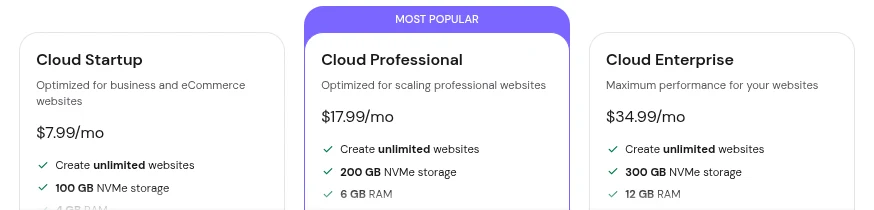
| Cloud Startup | $7.99 (48 months) | $25.99 | 4 CPU cores, 4 GB RAM, 100 GB NVMe | A business or store site without server work |
| Cloud Professional | $15.99 (48 months) | $44.99 | 5 CPU cores, 6 GB RAM, 200 GB NVMe | A busier site that needs more headroom |
| Cloud Enterprise | $29.99 (48 months) | $64.99 | 6 CPU cores, 12 GB RAM, 300 GB NVMe | A high-traffic site with no server admin |
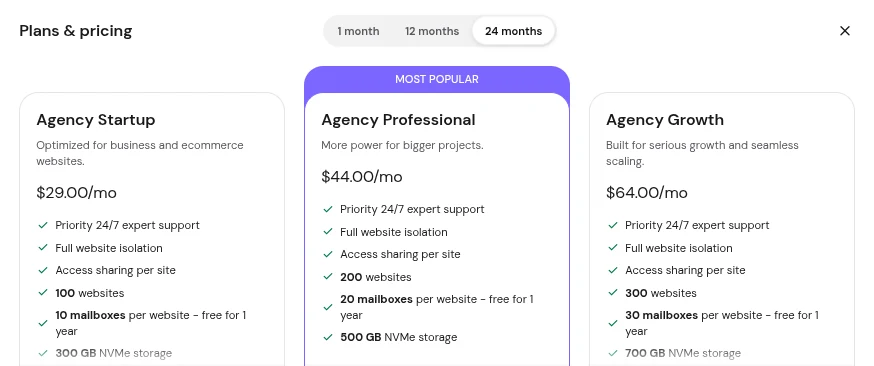
| Agency Startup | from $29.00 (24 months) | $49.00 | Up to 100 websites, 300 GB NVMe, isolated sites | Freelancers hosting client sites |
Cloud and Agency screenshots from 17 November 2026
Data as of 17 November 2026 for Cloud and Agency hosting (screenshots below). The shared hosting figures are from 10 November 2026. The long terms make the first price look very low, so compare the renewal column, not the first one.
Hostinger also sells email, an AI website builder and AI agents. I haven’t tested those, so I don’t recommend them. Only consider them if they replace something you already pay for.
How I’d choose between the three
- VPS: you want root access, custom software like n8n or Ollama, and you’re comfortable with Linux.
- Cloud: you want dedicated resources for a site or store but don’t want to administer a server.
- Agency: you host several client websites and want them isolated from each other.
- Shared: one simple site, low traffic, no custom software.
After you buy: the first hour on a new server
A fresh VPS is reachable from the internet within minutes, so lock it down before you install anything. These steps assume Ubuntu 24.04, and they take about 15 minutes.
# Record the start time and system state (keep this output as a baseline)
date -u && hostnamectl

# Update all packages
sudo apt update && sudo apt -y upgrade

# Create a non-root admin user and give it sudo
sudo adduser deploy
sudo usermod -aG sudo deploy

# Run this on your own computer: copy your SSH public key to the new user
ssh-copy-id deploy@YOUR_SERVER_IP

# After you confirm key login works, disable root login and password login
sudo sed -i 's/^#\?PermitRootLogin.*/PermitRootLogin no/' /etc/ssh/sshd_config
sudo sed -i 's/^#\?PasswordAuthentication.*/PasswordAuthentication no/' /etc/ssh/sshd_config
sudo sshd -t && sudo systemctl reload ssh

# Firewall: allow SSH, HTTP and HTTPS only
sudo ufw allow OpenSSH
sudo ufw allow 80,443/tcp
sudo ufw --force enable

# Brute-force protection and automatic security updates
sudo apt -y install fail2ban unattended-upgrades
Warning: keep your first SSH session open until you’ve logged in with the new user in a second window. If you close it too early, a mistake in the SSH settings can lock you out.
After that:
- First, check the backup and snapshot options in your Hostinger control panel, turn on what’s available, and take a manual snapshot before any big change.
- Next, put the domain behind Cloudflare if it’s a public site.To stop bots that probe for .env files, use this free Cloudflare rule. My SSL checker on tools.techtransit.org shows whether the certificate is set up correctly.
- Install what you came for. Then install your app, such as n8n, a Docker Compose stack or WordPress. Keep each app’s own ports closed in the firewall and publish only ports 80 and 443 through a reverse proxy.
- For more hardening, read my guides on SSH LoginGraceTime protection and two hidden Linux security risks: CLI timeout and sudo NOPASSWD.
How my partner code works, and where it stops
The code WEBSTART gives new Hostinger customers an extra discount on their first purchase. It doesn’t work on renewals, upgrades or extra services bought on an existing account. Hostinger decides who qualifies, and I can’t change that.
If you want to use it:
- Open my Hostinger link, which is an affiliate link.
- Choose your VPS plan and a 24-month term, or the term you prefer.
- Check that the code appears in the cart. If the price in the cart doesn’t match this page, trust the cart.
The limits, so nothing surprises you later:
- New customers only. If you already have a Hostinger account, buy normally, because the code won’t apply. I don’t recommend tricks to force it.
- First purchase only. Renewals are charged at Hostinger’s renewal rate.
- Domains are excluded. Domain registration and domain renewals aren’t part of the discount.
- Refunds. If you ask for a refund within Hostinger’s money-back period, I don’t earn a commission. That’s fine with me. The refund rules are Hostinger’s, so read their refund policy before you buy.
- Cookies. Hostinger may use cookies to credit the referral to me. My cookie policy explains what this site collects.
FAQ:
Pricing and the WEBSTART code
No. It applies to new Hostinger customers on a first purchase. Renewals, upgrades and extra services on an existing account are charged at Hostinger’s normal rates.
It depends on the plan. As of 10 November 2026, the renewal rates in the table above (my estimate from third-party price trackers, not confirmed by Hostinger, with no guarantee) are $11.99 a month for KVM 1, $14.99 for KVM 2, $28.99 for KVM 4 and $49.99 for KVM 8. Check your own renewal quote in your account, because Hostinger can change it.
Plans and refunds:
For typical workflows, yes. Memory is usually the limit, not CPU, so watch it with free -h after a week of real use, and move up a plan only if you see swapping.
As of 10 November 2026, Hostinger advertises a 30-day money-back guarantee on its pricing pages. The conditions are in Hostinger’s refund policy, so read it before you buy.
- Affiliate links. Links to Hostinger on this page are affiliate links. If you buy through them, I earn a commission and you pay nothing extra. I’m an independent partner, not Hostinger, and I say above where I’d pick another host.
- Prices can change. Hostinger sets prices, discounts and renewal rates and can change them at any time. The figures here are approximate (USD, before tax) and were correct on the date shown. Renewal rates are my estimate, with no guarantee. The price in your cart is the one that counts.
- Results vary. My test results describe one server on the day I ran them.
- Billing and refunds. Hostinger handles these. I can’t change an order, issue a refund or see your account.